15 Give Away Reward :)

Click Link To Get Reward :) / Klik Pautan Bagi Mendapatkan Hadiah :)
1 2 3 4 5 6 7 8 9 10 11 12 13 14 15
Showing posts with label Information. Show all posts

Friday, November 15, 2013

Tutorial : Make Proxy Grabber mini (VIDEO)

Assalamualaikum / Hi ,

Hari ini nak kongsi tutorial buat Proxy grabber sendiri / Today I want to share how to make a proxy grabber yourself .


Ok jom mula / Let's start ,

Tutorial kali ini aku dah siapkan video yang aq buat sendiri / During this tutorial I have made a video of tutorial myself

Tonton di sini / Watch here :


Wednesday, September 4, 2013

Command : How to Run Vega in Kali Linux

Assalamualaikum & Hello ;

Today I want to share how to use VEGA in Kali Linux
Hari ini nak kongsi cara guna VEGA di Kali Linux

What is VEGA / Apa itu VEGA ?

About VEGA
Vega is a free and open source scanner and testing platform to test the security of web applications. Vega can help you find and validate SQL Injection, Cross-Site Scripting (XSS), inadvertently disclosed sensitive information, and other vulnerabilities. It is written in Java, GUI based, and runs on Linux, OS X, and Windows.

Vega includes an automated scanner for quick tests and an intercepting proxy for tactical inspection. The Vega scanner finds XSS (cross-site scripting), SQL injection, and other vulnerabilities. Vega can be extended using a powerful API in the language of the web: Javascript.

Vega was developed by Subgraph in Montreal.
  Features
Modules
  • Cross Site Scripting (XSS)
  • SQL Injection
  • Directory Traversal
  • URL Injection
  • Error Detection
  • File Uploads
  • Sensitive Data Discovery

Tuesday, September 3, 2013

Open Owasp Mantra in Kali Linux

Assalamualiakum / Hello ;


Today I want to share how to run OWASP Mantra in Kali Lnux
Hari ini nak kongsi cara buka OWASP Mantra di Kali Linux

What is OWASP Mantra ?
Apa itu OWASP Mantra ?
Read here / Baca Sini : https://www.owasp.org


Tutorial :

Tutorial : Earn Money with Adf.ly in Social Page [Part 4/2]


Part 1 : Benefit and sign up 
Part 2 :  Shorten Url
part 3: adf.ly trick
part 4/1 : tutorial for facebook and twitter

Assalamualaikum / hello ;

let's continue the part 4/1 how to earn money in adf.ly using social page .
mari sambung cara  part 4/1 cara buat duit di adf.ly guna laman sosial

3. pinterset
----------------------------------------------

Tutorial : Shorten url in adf.ly [part 2]

Assalamualaikum & hello

Today i want to share how toshorten url in adf.ly
Hari ini nak ajar cara memendekkan pautan di adf.ly

 >,<

Read what is adf.ly in part 1 and sign up / baca apa itu adf.ly di part 1 dan mendaftar
link / pautan : part 1

Tutorial : Earn Money with Adf.ly in Social Page [Part 4/1]


Assalamualaikum / Hello / Salam ;


Part 1 : Benefit and sign up
Part 2 : Shorten url
Part 3 : Adf.ly Trick generate money 

This part 4/1

TOday I want to share METHODS to make money with Adf.ly in social page
Hari ini nak kongsi cara untuk buat duit di Adf.ly di laman sosial
etc :- facebook.com , pinterst.com , twitter.com ....

First you need to sign up an adf.ly account
Pertama anda perlu  mendaftar akaun di adf.ly
link : adf.ly

Read the way to sign up adf.ly in Part 1
Baca cara mendartar di Bahagian 1
Link / Pautan : Part 1

Methods / Cara :

1. Facebook
-------------------------------------------------------------
-make a share of free hot stuff trending right now in facebook

Sunday, August 4, 2013

Ninja Saga Npc Info

Salam,
Hi,

Today , Ninja Saga have archive 4th anniversery :)
Hari ini, Ninja Saga telah memcapai 4th anniversery :)

I want to share about Ninja Saga Npc Abbility :P
Saya ingin mengonsikan kebolehan Npc Ninja Saga :P

+++++++++++++++++++++++++++++++++++++++++++

Npc = Lvl 60

1st Npc : Keisuke


Info

Level : 60
Rank : Tensai Jounin
Ninjutsu : Fire-element and Water-element
Price : 60 Token

Stat
  •  Level: 60
  • HP: 33,600
  • CP: 33,600
  • Agility: Around 150+ 
Attack
  • (Kunai Slash): Deals 400 damage.
  • (Looks like Water Convergence): Casts Protection (90% damage taken) on the main character for 8 turns.
  • (Looks like a large Refresh barrier): Casts Regeneration (10-12% HP recovery) for 8 turns and casts Purify on the team.
  • (Looks like Raising Fire Explosion): Deals 600-800 damage and inflicts Burning (2% hp) for 4 turns.
  • (Looks like Kinjutsu: Fire Phoenix Breath): Deals 1,000 damage and inflicts Chaos for 3-4 turns.
  • (Triple Taijutsu Attack): Deals 200-250 damage three times.

2nd Npc : Masaki


Info

Level : 60
Rank :  Tensai Jounin
Ninjutsu : Thunder-element & Wind-element
Price : 60 Token

Stats
  • Level: 60
  • HP: 24,600
  • CP: 24,600
  • Agility: Around 250+
Attacks
  • (Sword Slash): Deals 400 damage.
  • (Lightning bolt-like barrier): Casts Strengthen (300% attack damage) on the main character for 8 turns.
  • (A large wind storm): Deals 1500 damage and inflicts Stun 5 turns for whole enemy.
  • (A ball of wind sphere): Deals 700-900 damage and inflict Disperse immediately.
  • (A large lightning bolt): Deals 500-600 damage and inflict Blind for 5 turns.
  • (Triple Taijutsu Attack): Deals 200-250 damage three times.
 ++++++++++++++++++++++++++++++++++++++++

Npc = Lvl 40

1st Npc : Shuji


Info

Level : 40
Rank : Tensai Chunin
Ninjutsu : Water-element
Price : 40 Token

Stats
  • Level: 40
  • HP: 9,000 approx.
  • CP: ???
  • Agility: 90+
Attacks
  • Normal Attack: Deals 300-400 damage.
  • (What looks like Refresh): Casts Strengthen on the main character for 6-7 turns.
  • (What looks like Dual Water Edge): Deals 400-450 damage.
  • (What looks like Twin Shark Missile): Deals 450-600 damage and inflict Stun for 4 turns.
  • Sword Attack: Deals 300-400 damage.
  • Triple Attack: Deals 120 damage three times. 

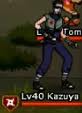
2nd Npc : Kazuya


Info

Level : 40
Pank : Tensai Chunin
Ninjutsu : Earth-element
Price : 40 Token

Stats
  • Level: 40
  • HP: 9,500 approx.
  • CP: ???
  • Agility: 89+
Attacks
  • Normal Attack: Deals 220 damage.
  • (What looks like Kinjutsu: Golem Protection): Casts Protection on the main character for 6-7 turns.
  • (What looks like Kinjutsu: Earth Absorption): Deals 350-450 damage and inflict Restriction for 2-3 turn.
  • (What looks like Earth Arm): Deals 250 damage and inflict Stun for 4 turns.
  • Sword Attack: Deals 220 damage.
  • Triple Attack: Deals 35-45 damage three times. 

++++++++++++++++++++++++++++++++++++++++++++

Npc = Level 20

1st Npc : Gekko


Info 

Level : 20
Rank : Genin
Ninjutsu : Earth-element
Price : 20 Token
Stats
  • Level: 20
  • HP: 2,000 approx.
  • CP: ???
  • Agility: 60+
Attacks
  • Normal Attack: Deals 100 damage.
  • (What looks like Kinjutsu: Golem Protection): Casts Protection on the main character for 3 turns.
  • (What looks like Kinjutsu: Earth Absorption): Deals 200 damage and inflict Restriction for 2 turns.
  • (What looks like Earth Arm): Deals 250 damage and inflict Stun for 2 turns.
  • Sword Attack: Deals 100 damage.
  • Triple Attack: Deals 35-45 damage three times. 

2nd Npc : Ryuma


Info

Level : 20
Rank : Genin
Ninjutsu : Water-element
Price : 20 Token

Stats
  • Level: 20
  • HP: 2,000 approx.
  • CP: ???
  • Agility: 60+
Attack
  • Normal Attack: Deals 150 damage.
  • (What looks like Refresh): Casts Strengthen on the main character for 3 turns.
  • (What looks like Dual Water Edge): Deals 200 damage.
  • (What looks like Twin Shark Missile): Deals 250 damage and inflict Stun for 2 turns.
  • Sword Attack: Deals 150 damage.
  • Triple Attack: Deals 35-45 damage three times
+++++++++++++++++++++++++++++++++++++++

Thank You
Terima Kasih

Credit : NejiHyuga900

Wednesday, May 22, 2013

Kaitou Kid


Salam,
Hi,

Hari ini nak cerita tentang Kaitou Kid ,
Today I want to share about Kaitou Kid ,

Siapa itu Kaitou Kid ?
Who is Kaitou Kid ?

Ahli silap mata dibawah sinaran bulan purnama
Magician

Baca lagi di sini : Klik
Read more at here : Click

Where to read Kaitou Kid ?
Di mana nak baca Kaitou Kid ?
Baca Di Sini / Read At Here

Where to watch Kaitou Kid Online ?
Di mana nak tengok Kaitou Kid online ?
Watch here / Tonton di sini

Credit : wikipedia , mangafox , animeultima

~Xd

Jack The Ripper


Salam
Hi

Siapa itu Jack The Ripper ?
Who is Jack The Ripper ?


Jack the Ripper is the best-known name given to an unidentified serial killer who was active in the largely impoverished areas in and around the Whitechapel district of London in 1888. The name originated in a letter, written by someone claiming to be the murderer, that was disseminated in the media. The letter is widely believed to have been a hoax, and may have been written by a journalist in a deliberate attempt to heighten interest in the story. Other nicknames used for the killer at the time were "The Whitechapel Murderer" and "Leather Apron".

Attacks ascribed to the Ripper typically involved female prostitutes from the slums whose throats were cut prior to abdominal mutilations. The removal of internal organs from at least three of the victims led to proposals that their killer possessed anatomical or surgical knowledge. Rumours that the murders were connected intensified in September and October 1888, and letters from a writer or writers purporting to be the murderer were received by media outlets and Scotland Yard. The "From Hell" letter, received by George Lusk of the Whitechapel Vigilance Committee, included half of a preserved human kidney, supposedly from one of the victims. Mainly because of the extraordinarily brutal character of the murders, and because of media treatment of the events, the public came increasingly to believe in a single serial killer known as "Jack the Ripper".

Extensive newspaper coverage bestowed widespread and enduring international notoriety on the Ripper. An investigation into a series of brutal killings in Whitechapel up to 1891 was unable to connect all the killings conclusively to the murders of 1888, but the legend of Jack the Ripper solidified. As the murders were never solved, the legends surrounding them became a combination of genuine historical research, folklore, and pseudohistory. The term "ripperology" was coined to describe the study and analysis of the Ripper cases. There are now over one hundred theories about the Ripper's identity, and the murders have inspired multiple works of fiction.
Read More at here : Click
Source : en.wikipedia.org


Jack the Ripper (Jack si Perobek) adalah gelaran untuk pembunuh bersiri misteri yang melakukan rangkaian pembunuhan bersiri dan pencacatan di London, England pada abad ke-19.

Pada 31 Ogos 1888 lewat tengah malam, di daerah East End di bandaraya London, England yang dikenali dengan nama Whitechapel (daerah lampu merah di London) pernah heboh dengan aksi pembunuhan bersiri sadis terhadap sejumlah wanita pelacur. Identiti pembunuh hingga kini tidak berjaya disingkapkan. Polis hanya mengetahui bahawa pembunuh menggelar dirinya sebagai "Jack the Ripper" melalui satu surat yang disebarkan media.

Jack The Ripper tidak meninggalkan satu bukti pun dalam tindakan jenayahnya, pola pembunuhannya pun tidak diketahui. Satu-satunya persamaan antara korban-korbannya ialah bahawa mereka adalah wanita pelacur. Ramai pakar menunjuk kepada kelaran dalam pada leher, perut dan pencacatan alat kelamin, pengeluaran organ dalaman, dan peningkatan pencacatan pada bahagian muka merupakan ciri-ciri modus operandi Jack the Ripper.[1] Dua kes pertama dalam fail pembunuhan di Whitechapel, yang berkait dengan Emma Elizabeth Smith dan Martha Tabram, tidak selari dengan pola ini dan tidak diiktiraf.[2]

Jack The Ripper membunuh mangsanya tanpa belas kasihan. Setelah memotong leher mangsanya, Jack The Ripper kemudian mencacatkan mereka. Bagaikan bayangan di waktu malam, tidak ada seorangpun yang dapat menyingkap siapakah Jack The Ripper sebenarnya. Walaupun Jack The Ripper "hanya" beraksi sekitar kurang satu tahun, korbannya sangat banyak dan telah menjadi legenda sampai sekarang.

Ada juga dugaan bahawa pelaku merupakan seorang doktor atau setidaknya orang yang mempunyai latar belakang pendidikan kedoktoran khusus dalam bidang operasi bedah kerana kelaran-kelaran di tubuh mangsanya sangat rapi yang hanya dapat dilakukan menggunakan alat-alat pembedahan kedoktoran yang memerlukan keahlian khusus.

Identiti Jack the Ripper sampai hari ini masih merupakan misteri; terdapat spekulasi menjangkakan bahawa Jack the Ripper telah menyeberangi Lautan Atlantik dan tinggal di Amerika Syarikat selepas melakukan pembunuhan-pembunuhan tersebut.
Baca lagi di sini : Klik
Sumber : ms.wikipedia.org


Thank You / Terima Kasih

~Xd

Scroll Bar Info


Salam
Hi

Hari ini nak kogsi informasi tentang scroll bar
Today I want to share information about scroll bar

View this image for information
Lihat gambar ini untuk informasi

1. body / badan


2. Color / Warna


3. CSS


Example : / Contoh:


Thank You
Terima Kasih

~Xd

Tutorial : Make Scroll Bar in Blog


Salam
Hi

Hari ini nak kongsi tutorial/cara buat skrol bar di widget blog
Today I wat to share tutorial/way to make scroll bar in blog widget

1. Open a new Html/java script in blog widget
1. Buat halaman Html/java script yang baru di widget blog

2. Copy this Code
2. Salin Kod ini
Code / Kode
#####

3. Replace ##### with your code
3. Gantikan ##### dengan kod anda

5. Click save
5. Tekan simpan

Thank You / Terima Kasih

Credit : Xd

~Xd

Monday, May 6, 2013

Easy way [cara mudah] for manual Sql Inection :D


Salam,
Hi,

Today I want ro share simple dork for maual sql injection
Hari ini nak kongsi dork mudah untuk sql inection

inurl://group_concat(table_name)from information_schema--


Thank You
Terima Kasih
~Xd

Wifiway ~Way to free Wifi :D


Salam,
Hi,

Today I want to share about Wifiway.
Hari ini nak kongsi tentang Wifiway.
Wifiway is an Os to crack Wifi.
Wifiway ialah sistem operasi untuk mendapatkan kata laluan wifi


Dekstop image

Tool that use to crack wifi
Alat yang disedikan untuk crack wifi


Tool image . Source :seguridadwireless

Link To Download wifiway :
Pautan untuk muat turun :
Download version 3.4.iso

Wifiway Official Site : http://www.wifiway.org

Thank You
Terima kasih

~Xd

Always Words In Terminal ( Linux )


Salam,
Hi,

Today I want to show commands that always use in linux terminal in my view
Hari ini nak kongsi arahan yang selalu digunakan dalam linux terminal daripada sudut pandangan saya

1. Start the terminal / Membuka Terminal
Ctrl+Alt+T

2. Copy words / Salin perkataan
Ctrl+Shift+C

3. Paste words / Tampal perkataan
Ctrl+Shift+V

4. Check history / Lihat sejarah
history

5. Clear history / Bersihkan sejarah
history -c

6. Restart connection / Mula semula jaringan
/etc/init.d/networking restart

7. See gateway status / Melihat status gateway
netstat -nr

8. Test connection & LAN / Mencuba koneksi & LAN
ping 000.000.0.00 / ping www.site.com

9. DNS configuration / Konfigurasi DNS
vim /etc/resolv.conf
10. Test DNS configuration / Mencuba konfigurasi DNS
nslookup www.site.com

11. Processor information / Informasi prosessor
cat /proc/cpuinfo

12 . Memory information / Informasi memori
cat /proc/meminfo

13. File system size / Saiz sistem operasi
df -h / df

14. Disk information / Informasi cakera
fdisk -l

15. Usb information / Information Usb
lsusb

16. Linux driver information / Informasi pemandu linux
lsmod

17. Task manager
top

18. Update software / Mengemas kini perisian
apt -get update
19. Repair installation error / Memperbaiki kesalahan pemasangan
apt-get install -f
20. Webdite information / Informasi laman sesawang
whois www.site.com

21. Quit terminal / Keluar Terminal
exit / Alt+F4


That's all that I always use :D
Itu saja yang saya biasa gna :D
Seldom I use eg:iftop / ngrep /mysql .......
Yang jarang digunakan seperti iftop / ngrep / mysql ......

# My ViEw ~Xd

Thank you
Terima Kasih

~Xd

Tutorial : Install Gambas 3


Salam,
Hi,

Today I want to share how to install Gambas version 3 using the terminal.
Hari ini saya nak kongsi cara install Gambas versi 3 menggunakan terminal.

1. Open Terminal Ctrl+Alt+T
1. Buka Terminal Ctrl+Alt+T

2. Type this word :
2. Taip perkataan ini ini :

sudo su

add-apt-repository ppa:nemh/gambas3

apt-get update

sudo apt-get dist-upgrade

sudo apt-get install gambas3

sudo apt-get install -f


Tip: Use Ctrl+C = copy/salin & Ctrl+Shift+V =paste in terminal/tampal di terminal


3. Finish
3. Siap

Thank You
Terima Kasih

~Xd

Install Deepin Software Center in Ubuntu 12.10/12.04/Linux Mint


Salam,
Hi,

Today I want to share how to install deepin software center in Ubuntu 12.10/12.04/Linux Mint using terminal.
Hari ini nak kongsi cara install deepin software center di ubuntu 12.10/12.04/Linux Minint menggunakan terminal.

1. Open Terminal Ctrl+Alt+T
1. Buka Terminal Ctrl+Alt+T

2. Type this word :
2. Taip perkataan ini ini :

sudo add-apt-repository ppa:noobslab/deepin-sc

sudo apt-get update

sudo apt-get install deepin-software-center


Tip: Use Ctrl+C = copy/salin & Ctrl+Shift+V =paste in terminal/tampal di terminal


3. Finish
3. Siap

Thank You
Terima Kasih

Source / Sumber : noobslab

~Xd

Thursday, May 2, 2013

Twitter auto follower


Hi,
Salam,

Today I want to share how to make many follower in twitter
Hari ini saya nak kongsi cara buat banyak follower di twitter

The site that host this function is:
Halaman yang menydeiakaan perkhidmatan ini ialah:
Link 1
Link 2
Link 3
Link 4
Link 5

Thank You
Terima Kasih

~ Xd

Gimp ???


Hi,
Salam,

Today I want to share what is Gimp
Hari ini nak beritahu apa ituGimp

Gimp ??????????
Gimp function is same as adobe photoshop
Fungsi Gimp sama seperti adobe phothoshop
But !!! ||| Gimp is free for use :) ||| Photoshop is not free for use and need to buy :( |||
Tetapi !!! ||| Gimp percuma untuk di gunakan :) ||| Photohop berbayar untuk di gunakan :( |||

Ok that's all what I know :P
Ok itu aja yang aku tahu :P

Download Gimp

Thank You
Terima Kasih

~ Xd

Sunday, April 21, 2013

Hide Ip Manual ~ Proxies


Hello,
Salam,
Today I Want To Share You About How To Hide Ip Manual Method Use Proxies
Hari Ini Saya Nak Kongsi Tentang Cara Hide IP Secara Manual Guna Proxies

First of all , I will introduce you little about proxies
Pertama saya akan memperkenalkan sedikit apa itu proxies

Proxies is use to hide our real ip
Proxies digunakan untuk menyembunyikan ip kita


Picture is about how proxies function
Gambar menunjukkan funsi proxies

Ok let's see how to hide ip manual
Ok jom tengok cara hide ip manual

First, get Ip Proxies at here
Pertama, dapatkan Ip Proxies di sini
Proxies List 1
Proxies List 2
Proxies List 3
Proxies List 4
Proxies List 5
Proxies List 6

These are some proxies list
Ini saya sediakan sedikit proxies list

For change the Ip manual methode I will post Next
Untuk cara tukar Ip manual saya akan buat post nanti

Thank You
Terima Kasih

xd

Kali Linux


Hello,
Salam,

Today I Want To Share About Kali Linux
Hari Ini Saya Nak Kongsi Tentang Kali Linux

Kali Linux Os is a from Debian Linux Os that had been develop by Offensive Security
Kali Linux Os ialah daripada Debian Linux Os yang direka oleh Offensive Security

Kali Linux is also name by Backtrack Os version 6
Kali Linux juga dikenali sebagai Backtrack Os versi 6

Tool that have in Kali linux
Peralatan yang disediakan pada Kali Linux


This is screenshot of my Kali Linux dekstop
Ini screenshot dekstop Kali Linux saya

You can download at here:
Anda boleh muat turun di sini:
Download Os
Avaiable for direct dowbload or torrent download
Boleh di download secara terus ataupun torrent

Tutorial at here :
Tutorial ada di sini:
Jump to tutorial

Thank You
Terima Kasih

Xd

Ads

HOT NEWS